 DISH
DISH
How to Send Halloween Gifts to Employees in Minutes
Our new Halloween Gift Guide comes fully dressed for the occasion. Pick a budget, add your logo, and send a treat in minutes.
Halloween sneaks up on everyone. One minute it's September, the next someone in Slack is asking whether the office is "doing anything" for the 31st.
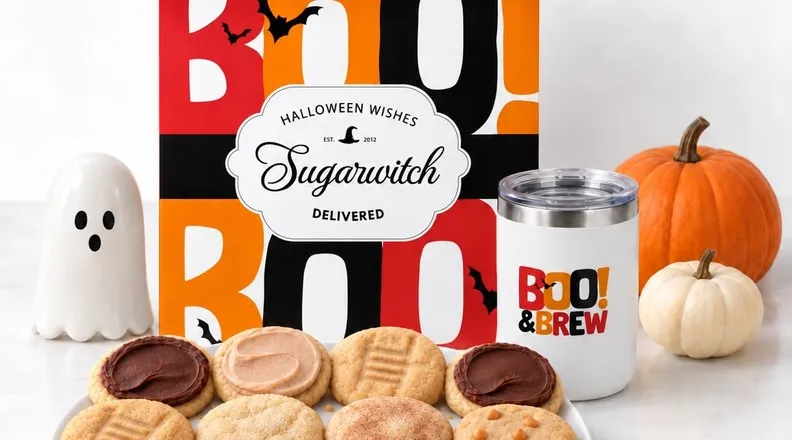
If they're asking you, good news: our new Sugarwish Halloween Gift Guide is full of gifts that are already in costume. Each one comes fully dressed, with the box, card, eCard and all the rest, so all you have to do is pick a budget and hit send. (You can still customize everything if you want to. You just don't have to.)
And like every Sugarwish, the best part happens on their end: they pick their own treats.
What is the Halloween Gift Guide?
It's one page with dozens of ready-to-send Halloween gifts. We planned every detail, from the box sleeve and card to the digital unboxing experience and even spooky-scary custom branded goods.
Every design comes branded or unbranded. If you're signed into your corporate account with a saved logo, we'll start you off with branding turned on.
How to Send Halloween Gifts to Employees (Faster Than Carving a Pumpkin)
- Open the Halloween Gift Guide.
- Pick a budget.
- Logo or no logo? Flip the toggle.
- Add your note and your people. Tweak the pre-written message if you like, then add one recipient or a whole list.
- Check out. That's it. No design queue, no waiting on proofs.
What's Included in Every Halloween Gift
Every gift on the guide comes with:
- A Halloween box sleeve, so the packaging is already in costume
- A Halloween eCard, ready for your message
- A printed box card, to be tucked inside the physical gift
- An animated email intro, a little spooky flourish when they open their gift
- Pre-designed drinkware options for gifts with personalized mugs and keepsakes. Recipients choose from 4-6 designs, so you don't need to upload a file.
Can You Add Your Logo to a Halloween Gift?
Halloween at work is rarely just "send candy." It's candy from us - something that feels like it came from your team, not a random vendor. The branding toggle takes care of that without a ticket to your design team. Flip it on and your logo shows up on the sleeve and card. Flip it off for a classic seasonal gift.
What Treats Can Recipients Choose Besides Candy?
Because recipients choose, a Halloween gift doesn't have to mean candy. Depending on the gift, they can pick Bakery & Cafe treats, Popcorn, or even Dog S'wag. (The office dog deserves a Halloween party too.) Nobody ends up with the gifting equivalent of a box of raisins.
"I really enjoy using the Sugarwish platform and got a lot of good feedback from our employees enjoying the sweet surprise and the ease of placing their order. Also, some appreciated having a variety of options, other than 'sweets.' Plus, I think your packaging is great! It has such a 'Wow' factor!" — Kara, Sugarwish customer
Who the Halloween Gift Guide Is Built For
- HR and People teams who need a company-wide Halloween send out the door fast, remote folks included
- Account managers and sales teams who want a light, seasonal hello for clients and prospects
- Last-minute planners (no judgment, we've all been there). Every gift is already built, so there's no design turnaround.
- Teams already sending branded Sugarwish gifts who want the same look in Halloween form
Your Halloween gift is ready when you are. Browse the Halloween Gift Guide →
Halloween Corporate Gifting FAQ
What is the Sugarwish Halloween Gift Guide?
It's a page with dozens of fully built Halloween gifts. Each one already includes a box sleeve, eCard, box card and animated intro. Pick a budget, a design, and whether to add your logo, then send.
How do I send a Halloween gift without building one from scratch?
Use the Halloween Gift Guide. Every gift is already put together, so you just pick a budget, choose branded or unbranded, add a recipient (or many), and proceed to check out.
Can I add my company logo?
Yes. Every gift and design comes with or without your logo. If you're signed in with a saved logo, branding starts out on, and you can toggle it either way before checkout.
How much do Halloween gifts cost?
Sugarwish gifts start at $27 (not including the box sleeve), and the guide has a range of price points from there. You pick the budget; your recipient picks their favorites.
Does it work for remote employees?
Yes. Gifts are delivered by email, text or Slack, so remote and in-office employees get the same experience.
Does everyone get the same gift?
Nope. Recipients choose their own favorites within the gift's category: Candy & Snacks, Bakery & Cafe, Popcorn, or Dog S'wag, to name a few.
What if I'm sending to a big team or client list?
The guide works for one gift or hundreds. For large sends, a WishLink lets you share one gift link instead of placing individual orders, and you're only billed for gifts that get redeemed.